In this tutorial, you will learn how to:
• Adjust ring volume/activate vibrate mode
• Access additional volume settings
• Change ringtone
• Turn on/off do not disturb mode
• Set a Bedtime mode routine
• Set a Bedtime mode routine
• Manually enable or disable Bedtime mode
Adjust ring volume/activate vibrate mode
Press the Volume buttons located on the left side of the device to adjust the volume. Select the Volume icon then select the Vibrate mode icon or Silent mode icon to enable.
Note: When Vibrate mode is active, the Vibrate mode icon will display in the Notification bar on the Quick Settings screen. When Silent mode is active, the
  Silent mode icon will display in the Notification bar.
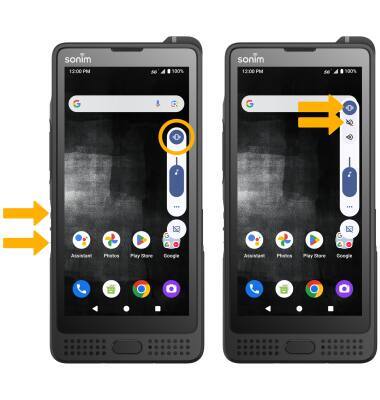
Note: When Vibrate mode is active, the
Vibrate mode icon will display in the Notification bar on the Quick Settings screen. When Silent mode is active, the Silent mode icon will display in the Notification bar. Access additional volume settings
1. Swipe down from the Notification bar with two fingers, then select the  Settings icon.
2. Scroll to and select Sound & vibration, then edit sound settings as desired.

Settings icon.2. Scroll to and select Sound & vibration, then edit sound settings as desired.
Change ringtone
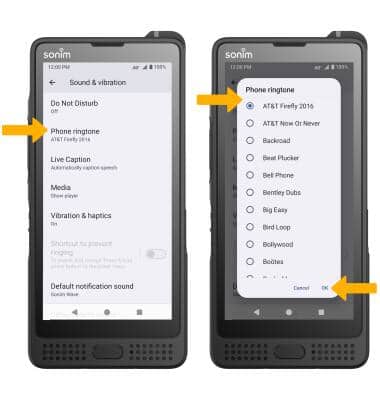
From the Sounds & vibration screen, scroll to and select Phone ringtone. Navigate to and select the desired ringtone, then select OK.
Turn on/off do not disturb mode
Swipe down from the Notification bar with two fingers, then select  Do Not Disturb.
Note: When Do not disturb mode is active, the Do not disturb icon will be displayed in the Notification bar. Do not disturb mode mutes sounds and the screen will remain off for incoming calls and alerts, but not alarms.
Do Not Disturb.Note: When Do not disturb mode is active, the
Do not disturb icon will be displayed in the Notification bar. Do not disturb mode mutes sounds and the screen will remain off for incoming calls and alerts, but not alarms.Set a Bedtime mode routine
1. Enabling Bedtime mode will automatically darken your screen and set your phone to Do Not Disturb during sleeping hours. From the home screen, swipe down from the Notification bar with two fingers, then select the Settings icon. Scroll to and select Digital Wellbeing & parental controls, then scroll to and select Bedtime mode.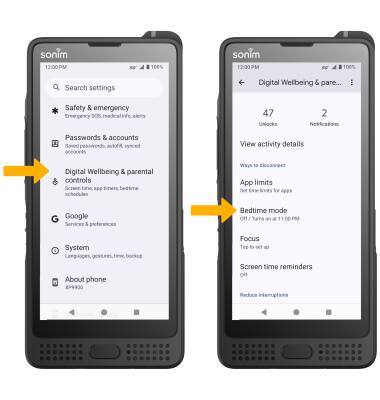
2. To setup a Bedtime routine, select the drop-down icon next to Bedtime routine, then edit the bedtime schedule as desired.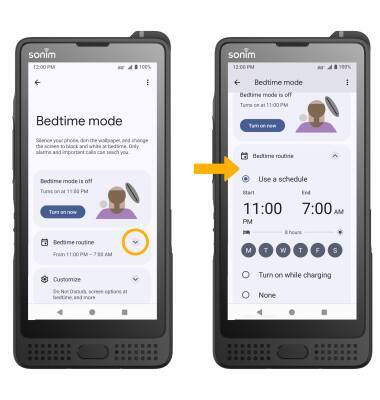
Manually enable or disable Bedtime mode
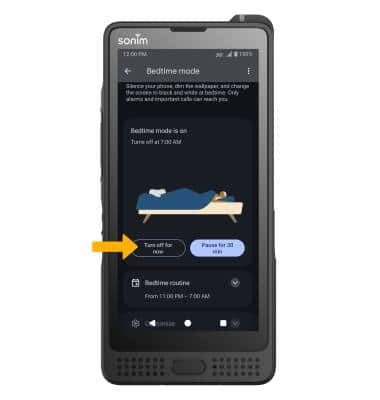
1. From Bedtime mode screen, select Turn on now to enable Bedtime mode.
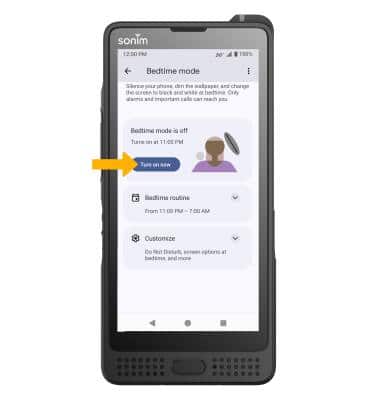
2. Select Turn off for now to disable Bedtime mode.
Note: Select Pause for 30 min to pause Bedtime mode.