
- To adjust the volume, press the Volume keys.

- To set the phone to silent, press the Down Volume key.

- When silent mode is on, the Silent icon will be displayed in the Notifications bar.

- To set the device to vibrate, from the home screen, press the Right Soft key.

- Select Settings, then press the Center Nav key.

- Select Profiles, then press the Center Nav key.

- Select the desired option, then press the Center Nav key.
Note: For this demonstration, "Silent" is selected.
- Select Alert Type, then press the Center Nav key.
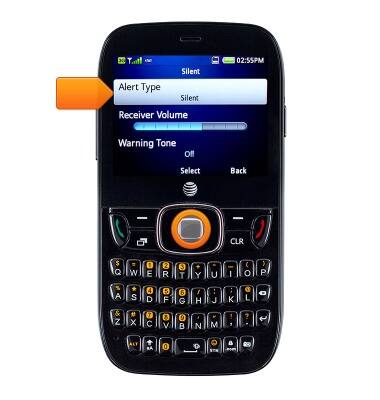
- Select Vibrate, then press the Center Nav key to save the change.

- When vibrate mode is on, the Vibrate icon will be displayed in the Notifications bar.

Sounds & alerts
ZTE Z432
Sounds & alerts
Change volume settings, ringtones, and notification alerts.
INSTRUCTIONS & INFO